Verizon Cloud - Website - Open / Play Media
Here's how to open or play your music, pictures, videos and documents via the Verizon Cloud website.
- From a web browser on a computer, sign in to My Verizon.
- Navigate: .
- From the 'Verizon Cloud' section, clickManage.
- ClickAccess Verizon Cloud.
- From the 'How to access Verizon Cloud' page, clickVerizon Cloud web portal(in the 'Access my Cloud' section).
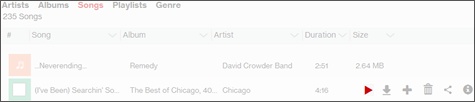
- Click the appropriate tab (at the top):
- Photos & Videos
- Music
- Open the appropriate file.
- Photos: Click theimage.
- Videos: Click the video then click thePlay iconon the next screen.
- Music: Hover over the video/song then click thePlay icon.