Verizon Internet Gateway - Factory Reset
Here's how to restore the Internet Gateway to factory default settings.
- This content is for the following Internet Gateway models:
- ASK-NCQ1338
- ASK-NCQ1338FA
- ARC-XCI55AX
- If you're unsure of the device model, refer to How to Identify Verizon 5G Home Equipment.
A reset to factory default deletes all changes made to the configuration and connected clients need to reconnect. It's advisable to perform a backup before performing a factory reset.
Reset via Device
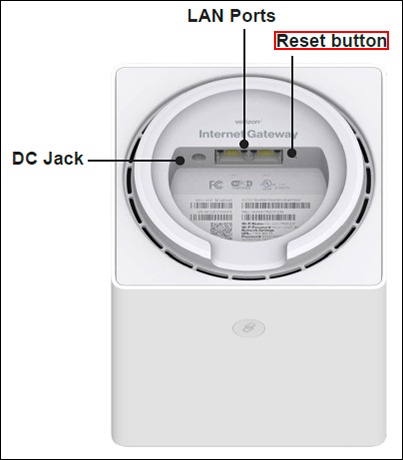
- With the router powered on, locate the Reset button (hole on the bottom of the router), press and hold the reset button for 3+ seconds.The front LED indicator will flash yellow to indicate a reset has been triggered, followed by fading in/out (white) while the Internet Gateway restarts.
- If a backup was done prior to the reset, perform a restore if desired.
Reset via Admin Page
- Access the router admin page then clickAdvanced(top).Refer to Access Admin Page for assistance.
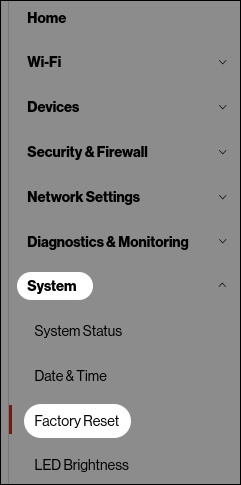
- From the left menu, clickSystemthenFactory Reset.
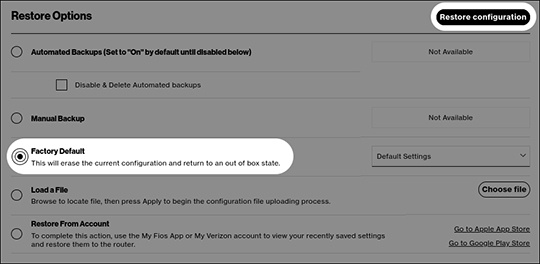
- From the 'Restore Options' section, clickFactory DefaultthenRestore configuration.
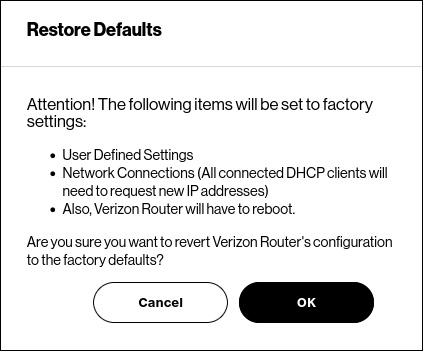
- Review the warning then clickOKto begin the restore process.
- If a backup was done prior to the reset, perform a restore if desired.