How to Identify Verizon 5G Home Equipment
Here's how to identify the model of the Verizon 5G Home equipment you're using.
Verizon Internet Gateway (WNC-CR200A)
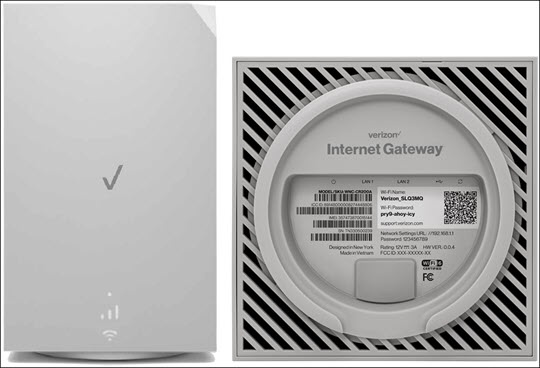
This router is a long, gray rectangle with a circular base.
Simply find the SKU name on the label placed on the back of the 5G Home equipment.
The equipment SKU for this router is WNC-CR200A.
For additional info visit the WNC-CR200A support page.
Verizon Internet Gateway (ASK-NCQ1338 / ASK-NCQ1338FA / ARC-XCI55AX)
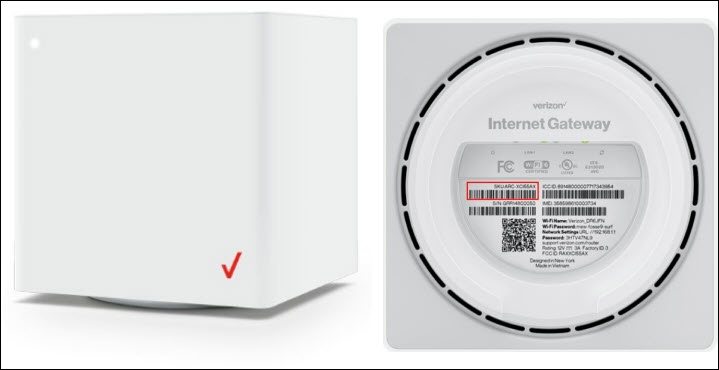
This router is a white cube with a circular base.
Simply find the SKU name on the label placed on the back or bottom of the 5G Home equipment.
For additional info visit the support page for the following:
Verizon 5G Internet Gateway (LVSKIHP)

The equipment SKU for this router is LVSKIHP.
For additional info visit the LVSKIHP support page.
Verizon Receiver (LV65) paired with CR1000A
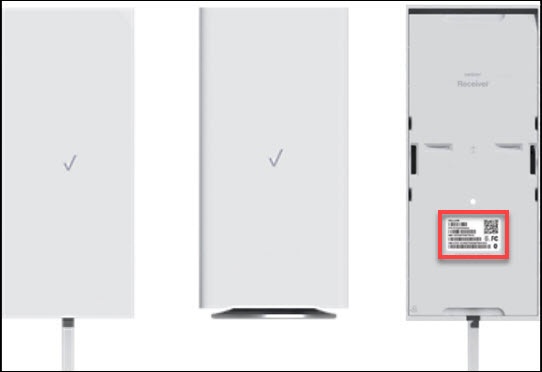
This receiver is a long, white rectangle with a white cord hanging off the bottom. It is typically paired with the CR1000A mentioned below. Review support links for both the receiver and the CR1000A router.
The equipment SKU for this router is LV65.
For additional info visit the LV65 support page.
Verizon Router (CR1000A) paired with LV65
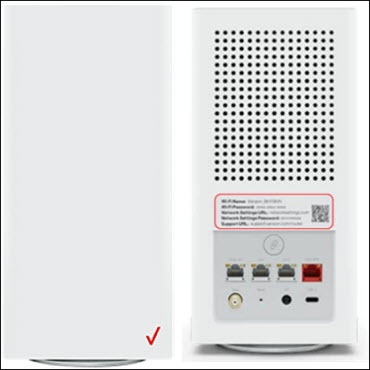
This router is a long, white rectangle with a circular base. It is typically paired with the LV65 receiver. Please review the support links for both the receiver and the CR1000A router.
The equipment SKU for this router is CR1000A.
For additional info visit the CR1000A support page.
5G Home Router (LVSKR1)
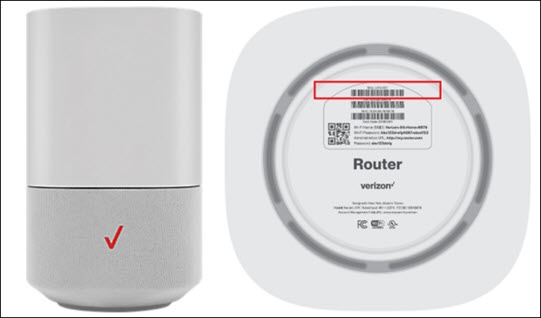
The equipment SKU for this router is LVSKR1.
For additional info visit the LVSKR1 support page.