My Verizon Website - Manage Plan
Here's how to change your plan via the My Verizon website.
- This process is only available to Account Owners / Managers.
- Plans can also be managed anytime via the My Verizon app.
- From a web browser, sign in to My Verizon.
- From the My Verizon Home page, navigate: .
- From the 'Your plan' section, select one of the following options:Options may vary based on the current plan and number of lines.
- To switch to a new unlimited myPlan:
- In the myPlan section, clickGet started
- If necessary, clickSelect plannext to the appropriate line.
- Select the desired plan then clickContinue.Selected when checkmark appears.
- ClickSelectunder the recommended plan you want for that device.If available, clickCustomizeto review details then clickContinue.If no plan recommendation is provided, select (check) the desired plan then clickContinue.
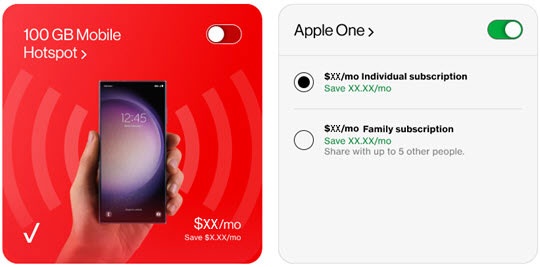
- From the 'Choose your perks' page, select the switch to turn the perk(s) on
then select the desired subscription if necessary.
Some subscriptions offer multiple options. Option selected when black dot appears.Image below is an example. - If necessary, repeat steps 2-4 for all remaining lines on the account.
- ClickContinue.
- If you're already on an unlimited myPlan:
- ClickManage data planunder 'Data'.
- Select the desired plan then clickContinue.Selected when checkmark appears.
- If prompted, select (check) your preferred Auto Pay and paper-free billing option then clickEnroll Now.To learn more about Auto Pay and paper-free billing or to sign up later, visit this link.
- From the 'Bill changes' section, clickSelect effective datethen select the desired option:Options vary by plan.Selected when black dot appears.
- First day of next bill cycle
- First day of this bill cycle
- Today
- Review the 'Here's how your account will change' screen then clickConfirm.Select 'Bill details' or 'Plan feature changes' to see more detail then clickBackto return to the 'Review your plan changes' screen.