Apple Watch - Dual SIM with an eSIM - Add Multiple Cellular Plans
Here's info on how to join Verizon with your eSIM on your dual SIM capable iPhone.
- Only 1 Verizon mobile number can be activated on an Apple Watch® at a time.
- You can have 1 Verizon mobile number and 1 from another carrier activated; however, they can't be used simultaneously.For instructions on switching between mobile numbers, refer to Switch Between Plans.
- The steps below apply to the Apple Watch Series 3 and newer models.
- Ensure your watch is set up with an Apple® iPhone® XS, XS Max, XR or later running iOS 12.1 or later.
- Before completing the steps below, ensure you have a cellular plan set up on both your physical SIM and eSIM.For info on adding a cellular plan to your eSIM, refer to Add Cellular Plan.
- From a Home screen, navigate:(lower-left).WatchMy Watch
- TapCellular.
- TapAdd a New Plan.If you see 'Set Up Cellular', refer to Set Up Cellular Service.
- From the 'Cellular Setup' screen, select the cellular plan you want to add (e.g., Primary, Secondary, (555) 555-5555, etc.).
- Enter your username to sign in to the My Verizon app then tapSign Me In.If you haven't registered your mobile number for use on the My Verizon app, tapI Need to Registerand follow the prompts.To activate service, you must sign in as an Account Owner or Account Manager. For more on account roles, review this info.
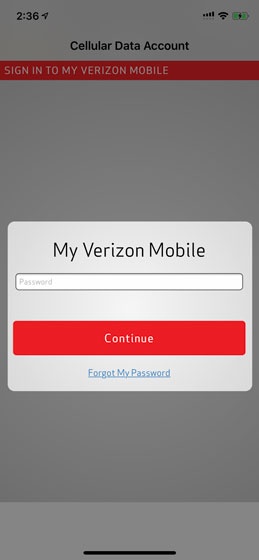
- Enter your password then tapContinue.Once you sign in, the system performs checks to see if you are on a compatible price plan.An error displays if your price plan is not eligible for Number Share; for more info on compatible plans, visit the Number Share FAQs.
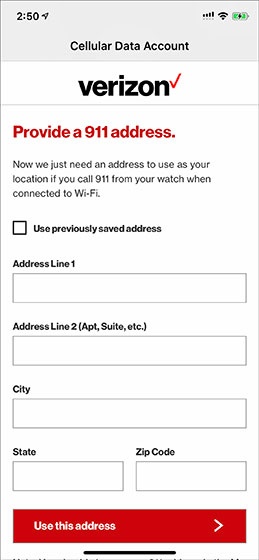
- Enter your 911 address then tapUse this address.If the address isn't found in the system, choose whether to use the suggested address or the address as entered.If you get an error, ensure the State is abbreviated (e.g., 'New York' must be entered as 'NY').
- From the 'Device Added' screen, tapOKto complete activation and open the Watch app.



For additional info on using your Apple Watch with a Dual SIM capable iPhone, refer to this Apple support page.