Verizon Cloud - Android - Install and Configure App
Here's how to install and configure Verizon Cloud on your Android device.
Check out the Verizon Cloud FAQs to learn more.
Palm Phone can't access Verizon Cloud directly. If this is your primary device, sign in to the Verizon Cloud website to manage your content.
- For best results, set up Verizon Cloud when the Android™ device has a good connection to the Verizon cellular network.
- To transfer content directly from one device to the other refer to Verizon Cloud - Transfer Content - Android for assistance.
- Contacts are automatically restored to the device during the installation and configuration process.
- Unless a tablet has its own 10-digit mobile number, it's sharing a Verizon Cloud account with another device.
- SelectVerizon Cloudfrom the apps screen then tapInstall.If necessary, tapPlay Storethen enter Verizon Cloud in the search field (top).
- If the Cloud app doesn't open automatically, open it from the Apps list.
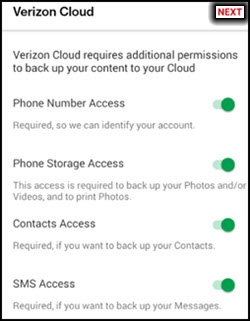
- If prompted, tap theSwitch iconto turn permissions on
or off
then tap
NEXT(upper-right).If presented, tapAllowto grant Cloud access to content on the phone. - TapGet Started.
- If prompted, enter the My Verizon password for the device then tapSign in.The phone number must be registered for My Verizon.
- If prompted, enter the one-time PIN sent via email during first-time setup then tapNext.
- Select the desired option(s) then tapNext.Option selected when a checkmark is present.
- If prompted, tapRegisterthen follow the on-screen prompts to complete your profile.If you choose 'Not Now', you can set up a profile after setup is complete.