Samsung Devices - Add Cellular Plan Using an eSIM
Here's info on how to add a cellular plan for your eSIM to your Dual SIM capable Samsung device.
To check if your device is eSIM (embedded SIM) capable, navigate: then view IMEI (eSIM).
Alternatively, you can navigate: to view or add an eSIM.
Before completing the steps below, verify:
- Your device is unlocked:
- Devices purchased directly from Verizon are unlocked 60 days after purchase.
- Only unlocked devices are eligible for dual SIM functionality.
- Your eSIM activation has been processed:
- If you're an existing Verizon customer:
- For a new line of service, contact Consumer Sales at (800) 225-5499 to activate your eSIM.
- For an existing line, contact Customer Service at (800) 922-0204 to activate your eSIM.
- Your device is connected to the Verizon wireless network or has a Wi-Fi connection.The eSIM won't activate if you're outside the Verizon coverage area. Ensure you activate the eSIM prior to traveling abroad.
- Your device is running the current software version.
- From a Home screen, swipe up from the center of the display to access all apps.
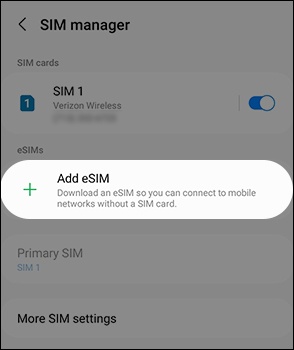
- Navigate:.SettingsConnectionsSIM manager
- TapAdd eSIM.
- If using a non-Verizon branded (BYOD) device, scan the provided QR code using your device's camera.Non-Verizon branded (BYOD) Prepaid devices don't support eSIM activation.The QR code is sent via email.
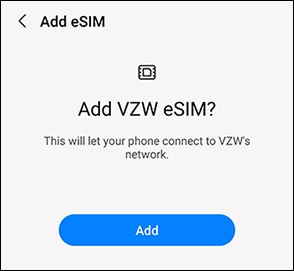
- When 'Add VZW eSIM?' displays, tapAdd.It may take several minutes to add your plan.If 'No plans found' appears, tapTry again.
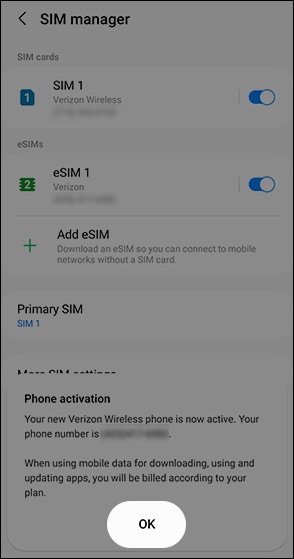
- When the 'Phone activation' message appears, tapOK.