Session status messages
Session Status

Due to inactivity, your session will end in approximately 2 minutes. Extend your session by clicking OK below.

Due to inactivity, your session has expired. Please sign in again to continue.

Samsung Devices - Enable / Disable eSIM Profile

2026-10-22 14:57:25.608

Samsung Devices - Enable / Disable eSIM Profile

Here's how to verify your eSIM profile is on or off on your Samsung device.
In order to see the eSIM options, the device must be running the current software version.
  1. From a Home screen, swipe up from the center of the display to access all apps.
  2. Navigate:
    Settings Settings icon
    Connections
    SIM manager
    .
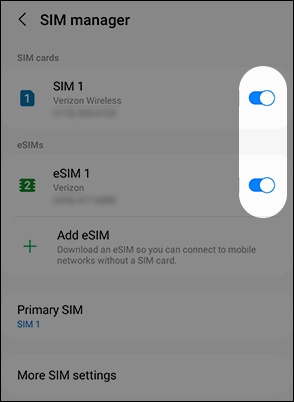
  3. Tap either of the SIM switches to turn on Switch on or off Switch off.
    To add an eSIM, refer to Add Cellular Plan Using an eSIM.
    The image below is an example.
    SIM switches
  4. Tap 'Turn off' or 'Turn on' to confirm.