Apple iPad - Add Cellular Plan with an eSIM
Here's info on how to add a cellular plan with an eSIM for your capable iPad.
Check out this VZ Tube Video for more info on eSIM activation.
The steps below apply to the following Apple® iPad® pple iPad models:
- iPad Pro (2021) and newer models
- This device ships without a physical SIM card.If a physical SIM card is preferred, ensure a 5G SIM card is inserted after the eSIM profile is activated.
- iPad (7th generation and 8th generation) activated on a business account.
Before completing the steps below, verify:
- Your device is connected to a Wi-Fi network.The eSIM won't activate if you're outside of the Verizon wireless coverage area. Ensure you activate the eSIM prior to traveling abroad.
- Your device is unlocked:Only unlocked devices are eligible for eSIM activation with Verizon.
- Your eSIM activation has been processed:
- A QR code is not required.
- If you're new to Verizon, refer to Add a New Line Using eSIM.
- If you're an existing Verizon customer:
- For a new line of service, contact Consumer Sales at (800) 225-5499 to activate your eSIM.
- For an existing line, contact Customer Service at (800) 922-0204 to activate your eSIM.
- From a Home screen, tapSettings
.
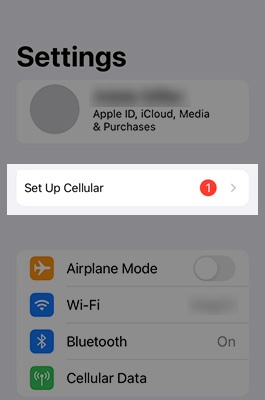
If an app isn't available on your Home screen, swipe left to access the App Library.Once your eSIM activation has been processed, a notification icon will appear on your settings icon as shown below. - Tap theSet Up Cellular banner(top of the Settings menu) then tapContinue.If unavailable, tap the 'Verizon Cellular Plan Ready to be Installed banner' (top of the Settings menu) then tap 'Continue'.Once you tap Continue, the eSIM activation begins and the services are enabled.If unavailable, contact Customer Service at (800) 922-0204 to have a eSIM profile reserved for your device.