Apple iPad - eSIM - Remove Cellular Plan
Here's how to remove a cellular plan from your eSIM capable iPad.
If you need to remove one of the cellular plans set up on your capable Apple® iPad® with an eSIM, follow these step-by-step instructions.
- The steps below apply to the following Apple® iPad® models:
- iPad Pro (2021) and newer models
- iPad (7th generation, 8th generation, and 9th generation) activated on a business account.
- Removing a cellular plan doesn't cancel your service. To cancel your service, contact your carrier.
- From a Home screen, navigate:SettingsCellular Data
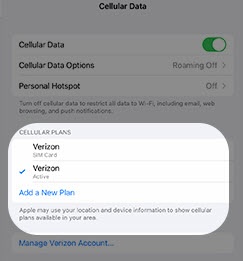
- From the 'CELLULAR PLANS' section, tap the plan you wish remove the cellular profile.The plan is selected when a blue checkmark is on the left.If the plan is already selected, skip to the next step.
- TapManage Verizon Account.This option only appears if an eSIM is activated.
- TapRemove Plan.
- To confirm, tapRemove.