Add discovery+ Subscription - My Verizon app
Here's how to add a discovery+ subscription via the My Verizon app
- Ensure your app is up to date as the following steps apply to the most recent version.If you're not able to access the My Verizon app, you can also visit the My Verizon website to manage your account.
- Subscribing to discovery+ isn't available in the My Verizon app on Apple devices unless included in your plan. Refer to Add discovery+ subscription - My Verizon Website to manage your subscription through a browser.For discovery+ eligibility and promotional offers, check out these discovery+ FAQs.
- Open theMy Verizon app
.
- Tap theAccount tab(at the bottom).If prompted, enter your password, fingerprint or Face ID.Only Account Owners or Account Managers can perform these steps, here's additional info on account roles.
- TapServices & perks.
- TapSee allin the 'Entertainment' section.
- TapLearn moreunder discovery+.
- Review the info then tapGet it now(upper-right).Option only appears for eligible accounts. For discovery+ eligibility and promotional offers, check out these discovery+ FAQs.
- To continue, accept the Terms & Conditions by selecting theI accept the discovery+ offer terms & conditions checkboxthen tapConfirm.
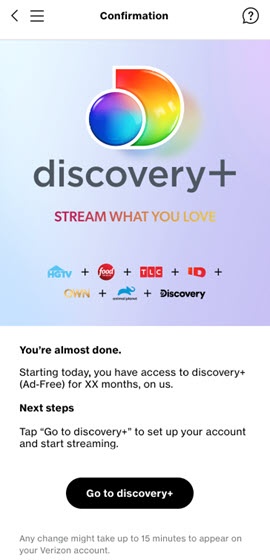
- Review the info then tapGo to discovery+.You're redirected to the discovery+ Account Creation page to finish the account setup, where you're required to create an account and given discovery+ app installation instructions.
- From the 'Create Your Account or Sign in' page, enter your email and create a password then tapAGREE & CONTINUE.
- Install the discovery+ app from the Apple App Store® or Google Play™ Store.
- Open the discovery+ app on your device, tapSign Inthen enter your discovery+ email and password.