My Verizon Website - Transfer Your Service
Here's how to authorize a Transfer Your Service request via the My Verizon website.
- Before transferring your phone line(s) to another account, verify:
- your account balance is current.
- you have an active wireless number for at least 30 days (standard monthly accounts) or 5 days (business accounts).
- you have the email address and full first and last name of the person who will be taking over your line.
- Available options vary based on user type (e.g., Account Owner, Account Manager, Account Member).
- For additional info, check out these Transfer Your Service FAQs.
- From a web browser, sign in to My Verizon.You can also authorize a transfer of service via the My Verizon app.
- Navigate: .
- From the 'I want to...' section, select from the following tabs then clickStart the transfer.
- Transfer my line(s) to someone else
- Transfer line(s) to me
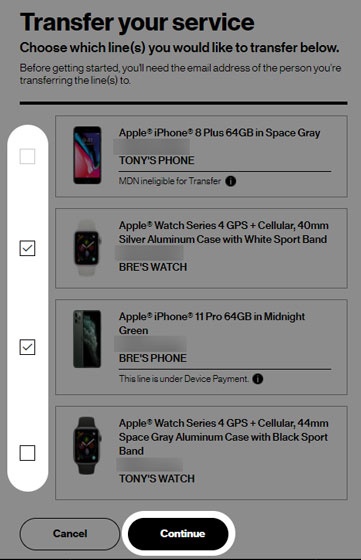
- Select the line(s) you want to transfer then clickContinue.Selected when a checkmark is present.
- Do one of the following:
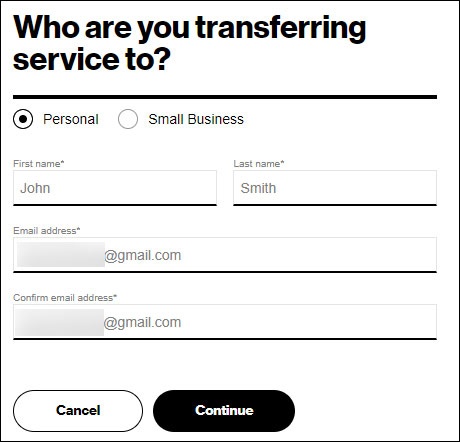
- To transfer to another Personal account:
- SelectPersonalthen enter the required info (e.g., First Name, Last Name, etc.).
- ClickContinue.
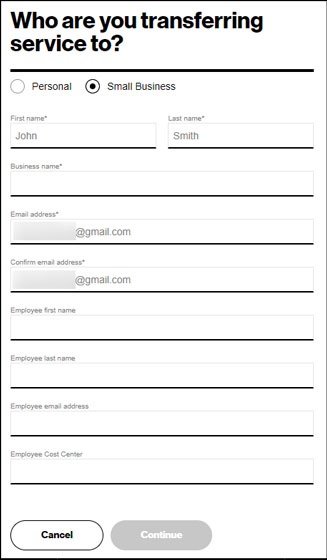
- To transfer to a Small Business account:
- SelectSmall Businessthen enter the required info (e.g., First Name, Business Name, etc.).
- ClickContinue.
- To continue, review and accept the applicable disclosures then clickAuthorize.
- Review the transfer request details then clickContinue.An email is sent to the new Account Owner containing instructions on how to complete the transfer request.The new Account Owner has 15 days to accept the service transfer.