5G Home Router - Turn Network Name (SSID) On / Off
Here's how to allow the Wi-Fi name of the 5G Home Router to be seen by other devices.
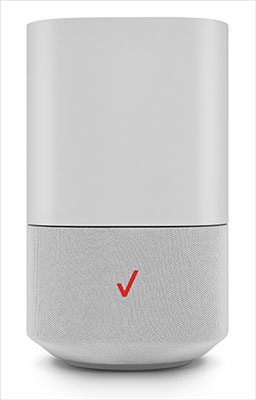
- This content is for 5G Home Internet. Here's info on Fios Home Internet.
- 5G Home Internet service is currently offered in specific areas. Here's how to check for 5G coverage availability.
- Every wireless access point (e.g., router, hotspot) has a network name or SSID (Service Set Identifier) assigned to it.
- SSID is typically broadcast by default, but can be turned off for greater security.
- When turned off, any device attempting an initial connection must know the SSID name and password to establish a manual connection to it.For the easiest connection experience, it's recommended to leave broadcast turned on.
- Sign in to the Admin WebGUI.
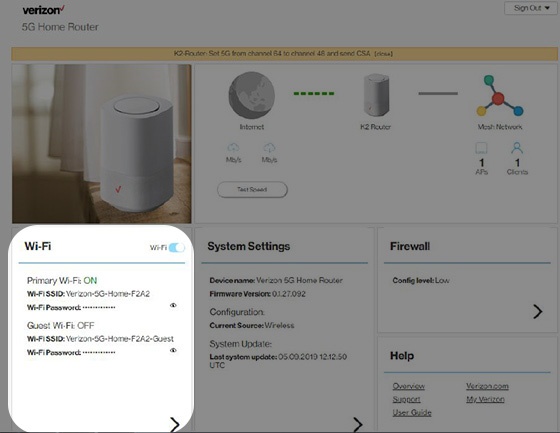
- From the Router Home screen, clickWi-Fi.
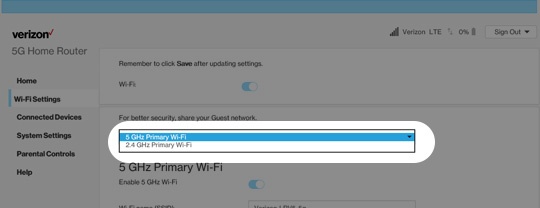
- From Wi-Fi Settings, click thePrimary Wi-Fi dropdown icon
then select one of the following to modify:
- 4GHz Primary Wi-Fi
- 5GHz Primary Wi-FI
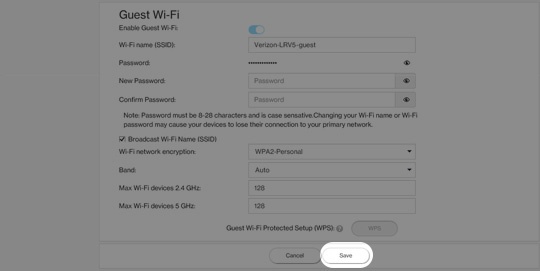
- From Wi-Fi Settings, locate and remove the checkmark from the 'Broadcast Wi-Fi Name (SSID)' field.Broadcast is enabled when a checkmark is present.If the SSID is disabled, the network settings on the computer must be updated. For assistance, select the appropriate operating system:
- ClickSave(at the bottom).