5G Home Internet - My Verizon Website - Test Signal Strength and Device Speed
Here's how to test speeds or view Wi-Fi signal strength for devices connected to a 5G Home router via My Verizon.
5G Home Internet service is currently offered in specific areas; click here to check for 5G coverage availability.
If you're having issues connecting all devices to the router, try restarting the router.
Measure Signal Strength
- From a web browser, sign in to My Verizon as the Account Owner or Manager.
- From the My Verizon Home screen, navigate: .
- Click Device overview.
- If necessary, click the5G Home tab.
- ClickManagebelow the appropriate device.
- Click theDevices tab.
- ClickTest your 5G.
- From the performance test screen clickMeasure signal strengththen clickStart.
- Allow several seconds for the test to complete.Only devices connected via Wi-Fi to the 5G Home router are tested (not devices connected via Ethernet or through Wi-Fi extenders).
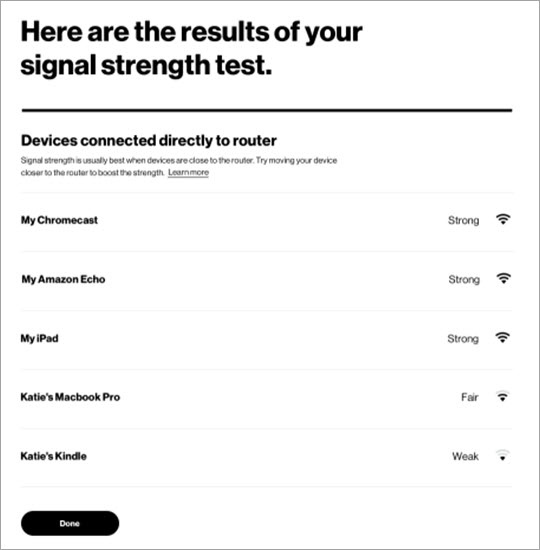
- View performance test results then clickDone.Attempt to move device closer to the router if signal is weak.
Run Speed Test
- From a web browser, sign in to My Verizon as the Account Owner or Manager.
- From the My Verizon Home screen, navigate: .
- Click Device overview.
- If necessary, click the5G Home tab.
- ClickManagebelow the appropriate device.
- Click theDevices tab.
- ClickTest your 5G.
- From the performance test screen clickRun speed testthen clickStart.
- From the 'Perform a speed test on the Router' screen clickStart test.
- Allow several seconds for the test to complete.Only devices connected to the 5G Home router are tested.
- View performance test results for download and upload speeds then clickDone.Data speeds vary based on equipment, location, data plan and other factors. See the Network Performance support page for more info.