5G Home Internet - My Verizon app - View Wi-Fi Signal Strength
Here's how to analyze a 5G Home Wi-Fi network signal quality via the My Verizon app.
5G Home Internet service is currently offered in specific areas; click here to check for 5G coverage availability.
- Ensure your app is up to date as the following steps apply to the most recent version.If you're not able to access the My Verizon app, you can also visit the My Verizon website to manage your account.
- Available settings vary based on user type (e.g., Account Owner, Account Manager, Account Member).
- Open theMy Verizon app
.
- Tap theAccount tab(at the bottom).If prompted, enter your password, fingerprint or Face ID.
- If necessary, tap the 'Home' or '5G Home' tab (at the top).Depending on your account services, the tabs displayed may vary.
- TapManage 5G Home.
- TapConnected Devices.
- TapTest signal strength.
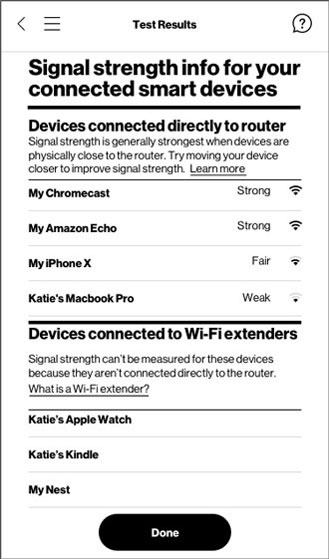
- From Test Results, review the signal strength of your connected devices then tapDone.
For additional info, check out these My Verizon app FAQs.