Apple Watch - Manually Pair
Here's how to manually pair your Apple Watch to your iPhone if the automated process doesn't work.
The steps below apply to the Apple Watch® Series 3 and newer.
- On the Apple Watch, press and hold theSide button(next to the Digital Crown) until the Apple logo is displayed.
- On your iPhone, tap the Watch app icon
.
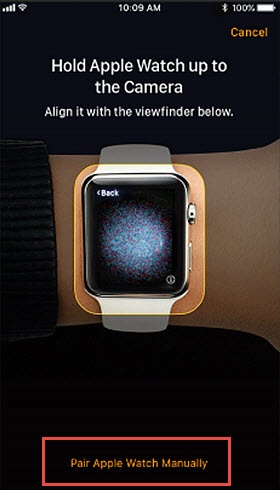
- TapStart Pairingon the iPhone.A pairing animation should appear on the Watch.
- TapPair Apple Watch Manuallyon the iPhone.
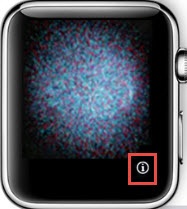
- On the Watch, tap theInfo icon.
- On the iPhone, tap the Apple Watch that corresponds to the name displayed on your Apple Watch.
- On the iPhone, enter the 6-digit code that is displayed on the Watch.Refer to one of the following for the remaining setup steps:
For additional help, refer to Apple Watch Support.