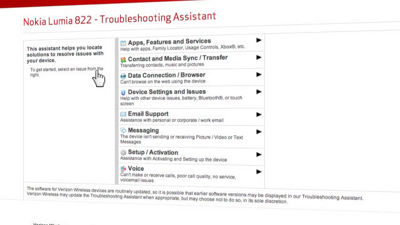
The "Troubleshooting Assistant" from Verizon Wireless allows you get solutions quickly for many of our devices. To access, select "Get Help With Your" then "Device" from the Support navigation, and select your device. If a Troubleshooting Assistant is available, you'll see a link at the top of the page. You can also go to vzw.com/troubleshooting, and select from a list of supported devices.
You'll see the Assistant is organized by categories to help you locate your specific issue. So for instance say you're having an issue with your personal e-mail, simply navigate over "E-mail Support" and you will see a tab to the right that says, "Personal." Go ahead and click that. From here you will see a checklist of steps. As you click each step additional details will be provided to walk you through the troubleshooting process. They will range from the simplest solution, to more complex.
At Verizon our goal is to give you the tools to determine issues with your phone so "trouble" can be resolved, and you can get on with the important things in your life.