Restore Settings to Factory Defaults - Verizon Jetpack® 4G LTE Mobile Hotspot MiFi® 4620L
If your Verizon Jetpack - MiFi 4620L powers off, crashes/resets, freezes or runs slow, view this info.
Restore Settings to Factory Defaults only if absolutely necessary as it removes all modified settings including Network Name (SSID), Wi-Fi / Admin Password, etc. and restores the default settings viewable on the external LED of the device
- Ensure the device is powered on.
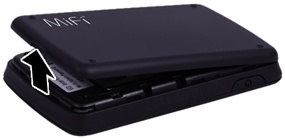
- Remove the battery cover.Utilizing the provided slot, carefully lift then detach the cover.
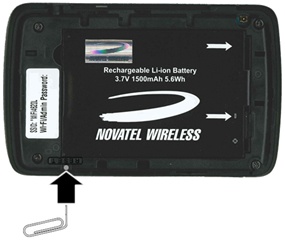
- Utilizing a paperclip (or similar tool), press and hold the reset button until MiFi® Resetting appears on the display, then release.Hold the button until the LED blinks one full blink and then a brief blink (5 seconds or less).
- Replace the battery cover.After restoring to factory defaults, ensure Power Management Settings are set to the preferred options.
Alternate Method
Alternatively, a restore can also be done as follows:
- Access the Admin Web Interface.
- From the System tab, clickSystem Status.
- From the System tab, clickReset to Factory Defaults.
- ClickOK.After restoring to factory defaults, ensure Power Management Settings are set to the preferred options.