Wi-Fi Extender (LVSKM1) - View LED Status Indicators
View this info for explanations of status LEDs on the Wi-Fi Extender LVSKM1.
- A recessed circular LED light surrounds the touchpad on top of the Wi-Fi Extender.
- The Status LED indicator displays solid white when your Network Extender is turned on, connected to the Internet, and functioning normally.
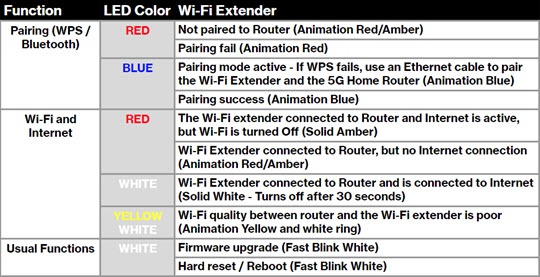
If a blinking yellow and white light is observed, move the extender closer to the internet gateway. See Wi-Fi Extender LVSKM1 - Activate / Set Up Device for info on proper setup.