Google Pixel Watch 2 - Wireless Emergency Alerts
Here's how to manage emergency alerts (e.g., AMBER Alerts, etc.) for your Pixel Watch 2.
Ensure your Pixel Watch 2 software is up to date as the steps below apply to the most recent version.
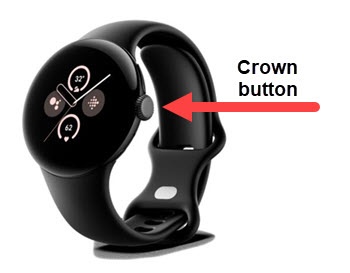
- From the Home screen, press theCrown buttonto open the apps screen.
- Navigate: .
- TapWireless emergency alerts.
- Tap any of the following to turn on
or off
:
- Allow alerts
- Amber alerts
- Extreme threats
- Severe threats
- Public safety messages
- State and local tests
- Vibration
- Spanish
- Speak alert message
- Show an opt-out dialog after displaying the first alert