Session status messages
Session Status

Due to inactivity, your session will end in approximately 2 minutes. Extend your session by clicking OK below.

Due to inactivity, your session has expired. Please sign in again to continue.

Google Pixel Watch 2 - Turn Wi-Fi On / Off

2026-10-22 19:12:06.627

Google Pixel Watch 2 - Turn Wi-Fi On / Off

Here's how to turn Wi-Fi for your Pixel Watch 2 on or off.
  • Ensure your Pixel Watch 2 software is up to date as the steps below apply to the most recent version.
  • Any apps or settings that are Wi-Fi reliant won't function while Wi-Fi is turned off.
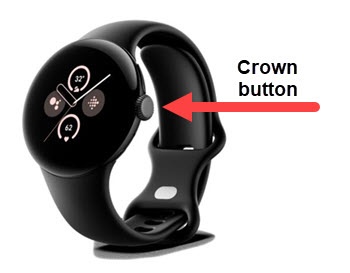
  1. From the Home screen, press the
    Crown button
    to open the apps screen.
    Crown button
  2. Navigate:
    Settings
    Connectivity
    Wi-Fi
    .
  3. Tap the
    Wi-Fi switch
    to turn on Switch on icon or Switch off icon.