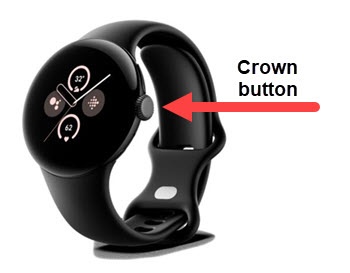
Google Pixel Watch 2 - Factory Data Reset (Powered On)
Here's how to factory / hard reset your Pixel Watch 2 if the screen freezes or call, app, audio or sync issues occur.
A factory data reset may help with a blank or frozen screen, apps crashing or freezing, touchscreen problems, can't hear, device making noises, can't make or receive calls, and device won't sync.
Performing a factory data reset removes all data from the device. Only perform a reset if absolutely necessary.
Ensure your Pixel Watch 2 software is up to date as the steps below apply to the most recent version.
- From the Home screen, press theCrown buttonto open the apps screen.
- Navigate: .
- Tap theCheckmark iconto confirm.If applicable, set up your device.