Google Pixel Watch 2 - Enable / Disable / Modify Screen Lock
Here's how to set up, change or disable the screen lock option (e.g., PIN, pattern) for your Pixel Watch 2.
Ensure your Pixel Watch 2 software is up to date as the steps below apply to the most recent version.
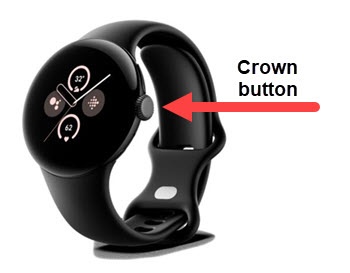
- From the Home screen, press theCrown buttonto open the apps screen.
- Navigate: .
- TapScreen lock.If prompted, enter the current PIN or pattern.
- Do one of the following:
- Set up or modify a PIN:
- TapPIN.
- Enter a numeric 4-digit PIN.
- Re-enter the numeric PIN.
- Set up or modify a pattern:
- TapPattern.
- Draw the desired pattern.
- Re-draw the pattern to confirm.
- To disable the screen lock, tapNone.