Verizon Internet Gateway (WNC-CR200A) - LED Status Indicators
Here's an overview of the LED indicators on the Internet Gateway (WNC-CR200A).
- This content is for the Verizon Internet Gateway (WNC-CR200A).
- If you're unsure of the device model, refer to How to Identify Verizon 5G Home Equipment.
- Make sure that the power cord is correctly connected to your router and the power supply adapter is correctly connected to a functioning outlet.
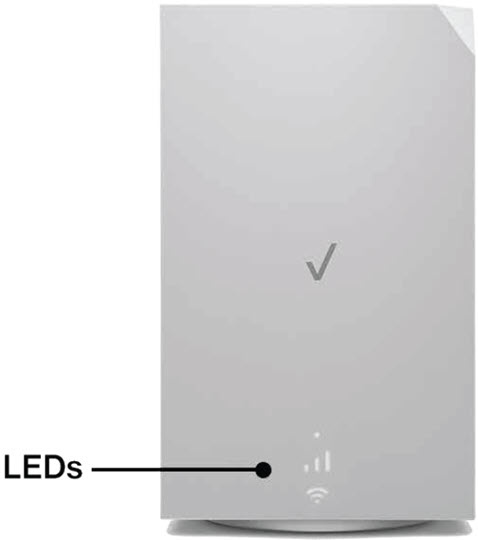
LED
Setup Mode
- After plugging it in for the first time, the Internet Gateway (WNC-CR200A) should take approximately 8-10 minutes to connect to our network. You may see the light fluctuating between red and white during this time. After 10 minutes the following table indicates the correct status.
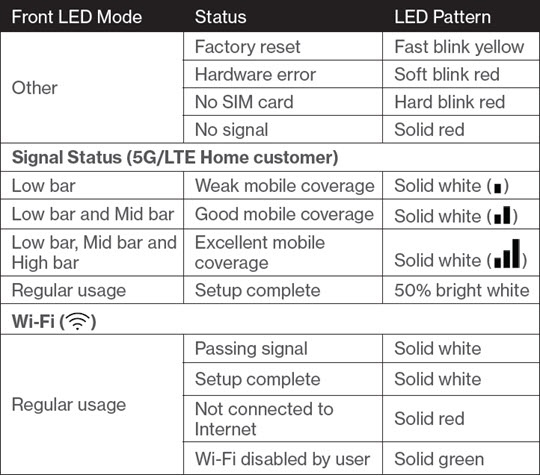
LED Descriptions
- After plugging it in for the first time, the Internet Gateway (WNC-CR200A) should take approximately 8-10 minutes to connect to our network. You may see the light fluctuating between red and white during this time. After 10 minutes the following table indicates the correct status.
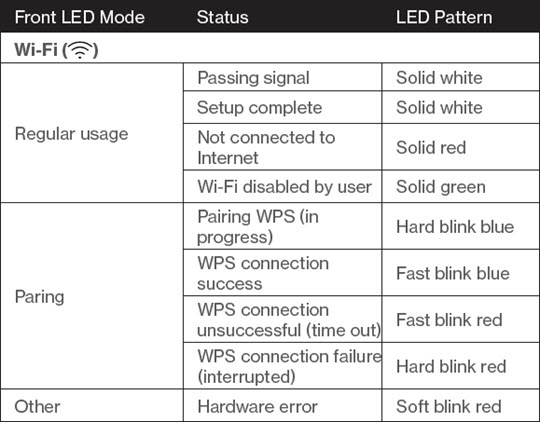
- The LED indicates the system and connection status and WPS activity.
- A cold SIM is an un-activated SIM card.