Verizon Internet Gateway (WNC-CR200A) - Establish Wired Connection
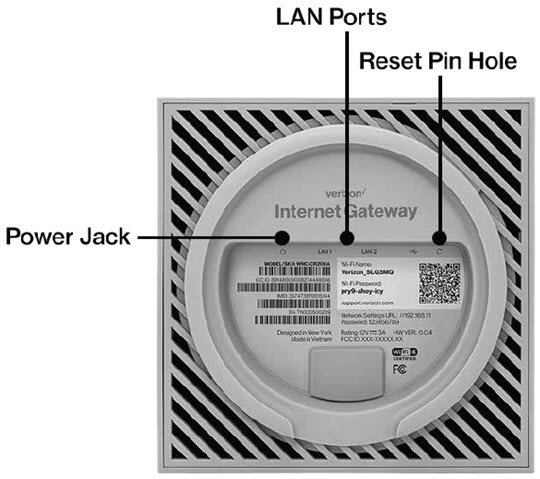
Here's how to establish a wired connection via Ethernet ports with your Internet Gateway (WNC-CR200A).
- This content is for the Verizon Internet Gateway (WNC-CR200A).
- If you're unsure of the device model, refer to How to Identify Verizon 5G Home Equipment.
- Plug one end of the Ethernet cable into any of the two gray Ethernet (LAN) ports on the bottom of the Internet Gateway.
- Plug the other end of the Ethernet cable into an Ethernet port on a computer.
- If necessary, power on the router and/or computer.Allow adequate time for both to power up and the computer to detect the Ethernet connection.
- From the computer, open a web browser to test connectivity.A successful Ethernet / hard-wired connection verifies the device is online and connected to the Internet. If an issue occurs during Wi-Fi connection, troubleshoot the Wi-Fi settings of the router and the device being connected.If testing fails, try replacing your ethernet cable and attempt to test the connection again.