Connected Car Wi-Fi (BMW) - Download eSIM Profile to Vehicle
Here's how to install the eSIM profile to your BMW Connected Drive vehicle.
- Ensure your Personal eSIM is activated using the BMW app.
- From the vehicle's head unit, tap theProfile icon
(upper right).
- TapAdd BMW ID.Sign in using the same BMW ID you used to sign in to the MyBMW app to setup your eSIM.Once signed in, the Personal eSIM auto downloads.
- Tap the preferred option:
- Settings from BMW Cloud
- Current settings
- To secure your Personal eSIM, select the following then follow the steps provided:
- Set PIN
- Link keyRefers to the vehicle's key fob.
- From the 'BMW ID has been set up successfully' screen, select the preferred option:
- Set up basic functions
- Remind me later
- Navigate: .
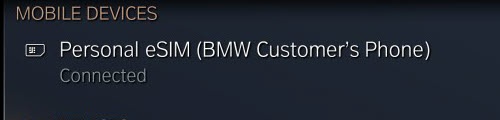
- TapPersonal eSIM.Confirm the status shows Connected. If not, wait for a moment for the status to show Connected.Once connected, the Personal eSIM is ready for use.If there are no devices listed in the 'Mobiles Devices' section, T&Cs must be accepted in the BMW app.
- ConfirmMobile data via eSIMis selected (checked).
- To enable voice calls, select (check)Telephone functions via eSIM.
- TapConnect new telephoneto link a new phone or use a nearby phone.It's recommended to use the same phone number used to sign up for Personal eSIM.
- To activate the mobile hotspot, navigate: .
- Confirm theInternet access for mobile devicesis turned on.
Check out these FAQs for additional support: