Verizon Internet Gateway - View Network Name and Password
Here's how to view the Wi-Fi name and password for the Internet Gateway.
- This content is for the following Internet Gateway models:
- ASK-NCQ1338
- ASK-NCQ1338FA
- ARC-XCI55AX
- If you're unsure of the device model, refer to How to Identify Verizon 5G Home Equipment.
- Wi-Fi Name (SSID): The name that identifies the wireless network.
- Wi-Fi Password: The password that's needed to connect to the Wi-Fi network.
The Wi-Fi name and Wi-Fi password can be viewed via the Admin Page or from the device.
View via Admin Page
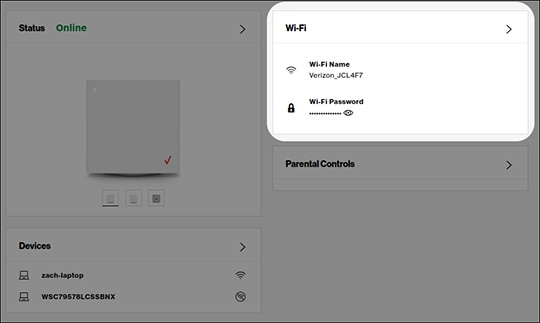
- Access the router admin page.
- From the 'Wi-Fi' section (upper-right), view the 'Wi-Fi name' or 'Wi-Fi password'.If necessary, click the 'Show password' icon
.
For more detailed info, and to change the Wi-Fi name or password, click theWi-Filink.
View via Device
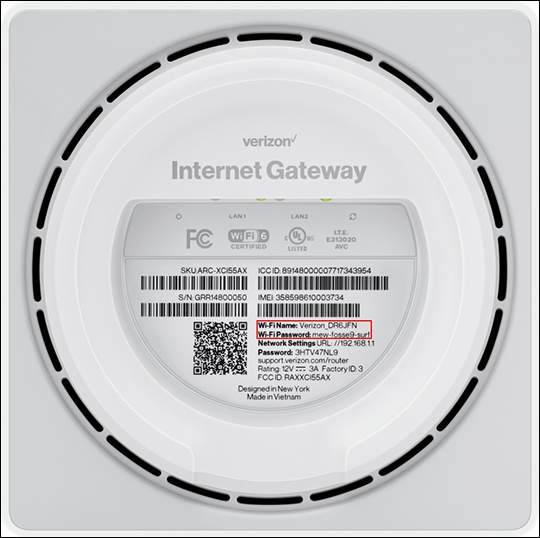
- Place the router face down on a flat surface.
- From the bottom of the router, view the default 'W-Fi Name' or 'Wi-Fi Password' on the label.