Remove Wireless Network Connections - Macintosh® OS X
This provides instructions for deleting or removing Internet connections on your Macintosh OS X computer. This may help if you're having issues connecting to Wi-Fi on your computer. Visit our Wi-Fi FAQs for additional info.
Here is some additional information about Wi-Fi.
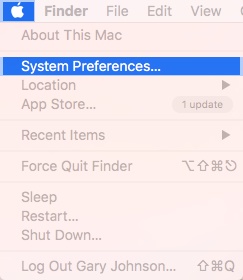
- From the Macintosh desktop, navigate: .
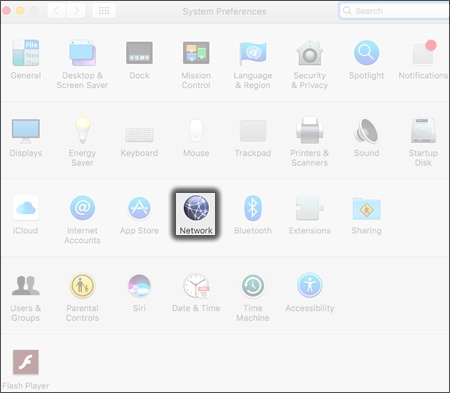
- ClickNetwork.
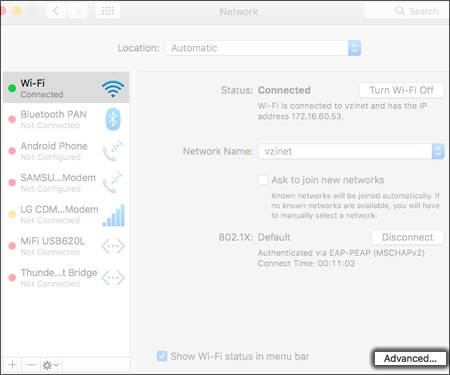
- From the Services listing, ensure Wi-Fi (Airport) is selected then clickAdvanced.
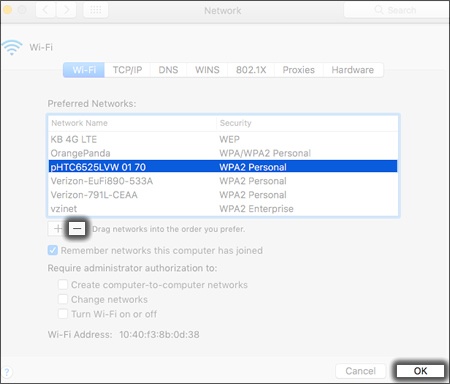
- From the Wi-Fi (Airport) tab, ensure the preferred network is selected and clickRemove Wi-Fi network(minus symbol) then clickOK.
- If presented, enter the password then clickOK.
- ClickApply(located in the lower-right).
For additional assistance, refer to Connect to a Wi-Fi Network.