Samsung Devices - Dual SIM Dual Standby (DSDS) - Change Default Mobile Number
Here's how to change the default mobile number used for cellular data on your dual SIM capable Samsung device.
- Only one mobile number can receive calls / messages or use cellular data at a time. If two mobile numbers are activated on the device and one is on an active call, calls to the other number will ring through to Voicemail but the incoming call doesn't appear on the screen. After hanging up on the active call, a missed call notification will be visible, as well as a Voicemail "new message" indicator (if the caller chose to leave a message).
- The primary SIM is the default cellular plan used for calls, text messages and data. Changing the primary SIM causes:
- new calls and messages to be sent from the phone number associated with that SIM, unless a contact has been linked to a specific SIM.
- data usage to be billed to that number.
- In order to see the eSIM options, the device must be running the current software version.
- From a Home screen, swipe up from the center of the display to access all apps.
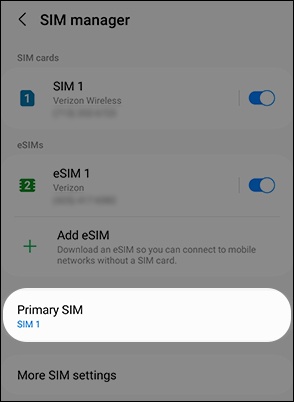
- Navigate:Settings>Connections>SIM manager.
- TapPrimary SIM.
- Select the desired SIM (e.g., SIM 1, eSIM 1, etc.).
- Review the 'Change primary SIM?' prompt then tapChange.