Verizon Router - Backup / Restore Current Configuration
Here's how to back up and restore the current configuration for your Verizon Router.
Here's how to back up and/or restore the current configuration of your Verizon Router in case you need to restore settings to factory default for troubleshooting purposes. Backing up allows settings, like Wi-Fi connected devices, to be automatically reconnected after settings are restored.
- Sign in to the Admin WebGUI.You must be connected to the Verizon Router via Wi-Fi or Ethernet to access the admin page.
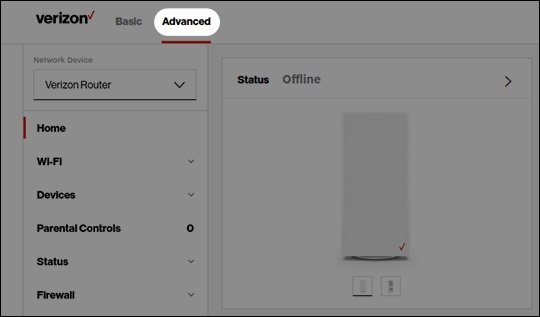
- From the Home screen, clickAdvanced(at the top).
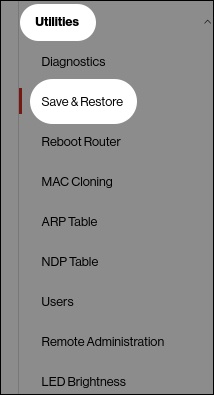
- From the left menu, clickUtilities>Save & Restore.
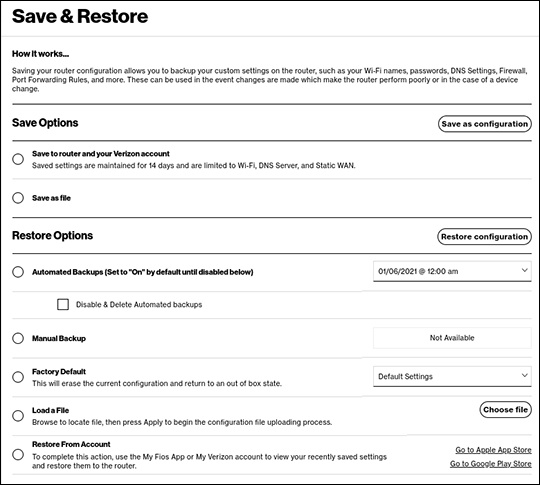
- From Backup & Restore, do one of the following:
- Backup Settings:
- From the 'Save Options' section, clickSave as file.
- Click theSave as configurationbutton.
- Restore from Backup:
- From the Restore Options section, clickLoad a file.
- ClickChoose file.
- Locate and select the backup file then clickOpen.
- Click theRestore configurationbutton.