Apple iPad - Enable / Disable eSIM Profile
Here's how to verify your eSIM profile is on or off on your iPad.
- The steps below apply to the following Apple® iPad® models:
- iPad Pro (2021) and newer models
- iPad (7th generation and 8th generation) activated on a business account.
- The Apple iPad models only use one active SIM profile at a time and are not Dual SIM Dual Standby compatible at this time.
- From a Home screen, tapSettings
.
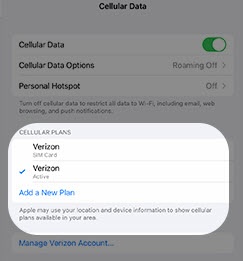
If an app isn't available on your Home screen, swipe left to access the App Library. - TapCellular Data.If the 'Select Carrier' section is viewable, either Add Cellular Plan or contact Customer Service at (800) 922-0204 to have a eSIM profile reserved for your device.
- From the 'CELLULAR PLANS' section, tap the line for the eSIM to enable or disable the profile.The plan is enabled when a blue checkmark is on the left.