Stream TV - Check Device Storage
Here's how to check available space if your 2nd-generation Stream TV runs slowly / crashes, apps freeze or you can't save media.
To free up space if your device runs slow or crashes/resets, apps freeze when running them, or you can't save media, view this info.
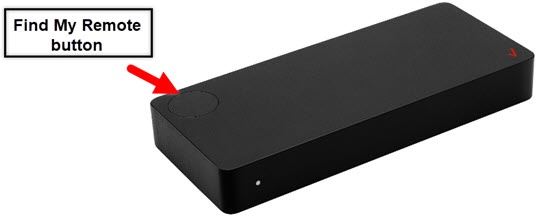
- The steps below apply to the 2nd-generation Stream TV which can be identified by the Find My Remote button. If you have the original Stream TV model, refer to Stream TV - Check Device Storage.
- Ensure your Stream TV is up to date as the following steps apply to the most recent version.
- If necessary, press theHome button
on your Stream TV remote to wake up your device.
- From the Stream TV Home screen, select theSettings menu
(upper-right).
Utilize 5-way navigation pad on the remote to highlight and the center (OK) button to select. - Nagivate: .
- SelectInternal shared storage.
- View free space in the Available section.If the device memory is full, clear app cache or uninstall apps from the device.
For additional info on Stream TV, check out the Stream TV support page.