Apple Watch - Use the Blood Oxygen App
Here's how to use the Blood Oxygen app on your Apple Watch Series 6 or later.
- The steps below apply to the Apple Watch Series® 6 or later.
- Ensure your Apple Watch Series 6 or later is updated to the latest version of watchOS.
- The Blood Oxygen app isn't available for users under 18 years old.
- The Blood Oxygen app isn't available while an Apple Watch is set up in Standalone Mode (Set Up for a Family Member).
- For more info on the Blood Oxygen app, check out this Apple Support page.
Take a Blood Oxygen Measurement
- Using your iPhone, open theHealth app
.
- Tap theBrowse tab(lower-right).
- TapRespiratorythen tapBlood Oxygen.
- TapEnablethen follow the on-screen instructions.
- Ensure your Apple Watch fits comfortably on your wrist.
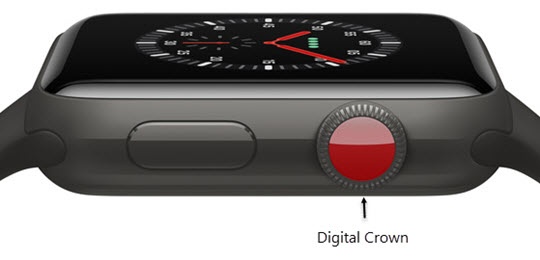
- From the Watch face screen, press theDigital Crownto access the Apps screen.
- Tap theBlood Oxygen app.
- While remaining still and ensuring your wrist is flat with the Apple Watch facing up, tapStart.
- Keep your arm steady for 15 seconds then view the results.
Enable / Disable Background Measurements
- Using your iPhone, open theHealth app
- Tap theBrowse tab(lower-right).
- TapRespiratorythen tapBlood Oxygen.
- TapEnablethen follow the on-screen instructions.
- From the Watch face screen, press theDigital Crownto access the Apps screen.
- Tap theSettings icon
.
- TapBlood Oxygen.
- Tap any of the following to turn on
or off
:
- In Sleep Mode
- In Theater Mode
View Health Info
- Using your iPhone, open theHealth app
- Tap theBrowse tab(lower-right).
- TapRespiratorythen tapBlood Oxygen.
- View your Blood Oxygen info.