OnePlus 8 5G UW - Factory Data Reset (Powered Off)
Here's how to factory / hard reset your OnePlus 8 5G UW if the screen freezes or call, app, audio or sync issues occur and the device won't start up.
- Perform a factory data reset only if necessary as it removes your Google™ account and all data including system data, app data and media.
- For devices with Android™ Device Protection turned on, it's imperative Google sign-in credentials are known prior to completing a factory reset with the device powered off. If credentials are unknown, do one of the following:
- Attempt to sign in with any Google account previously used on the device.
- Reset the password via the https://www.google.com/accounts/recovery website.
- If a pattern, PIN, etc. is or has ever been set up on the device, Google account sign-in is required during initial setup.
- Ensure the device is powered off.If the device is responsive and can be powered on, the preferred reset method should be performed.
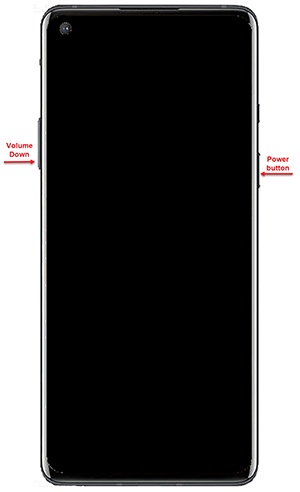
- Simultaneously press and hold theVolume DownandPower buttonuntil the device vibrates and the Android Recovery screen appears then release all buttons.Allow up to 30 seconds for the recovery screen to appear.
- From the OnePlus logo screen, select a Language.Utilize the Volume buttons to cycle through the available options and the Power button to select.
- SelectWipe data and cache.
- SelectErase everything (Music, pics, etc).Allow several minutes for the reboot process to complete.
- From the 'User data partition' screen, selectThis can not be undone, continue?.Allow several minutes for the reboot process to complete.
- From the Format success screen, select 'Reboot' or 'Done'.If applicable, set up your device.