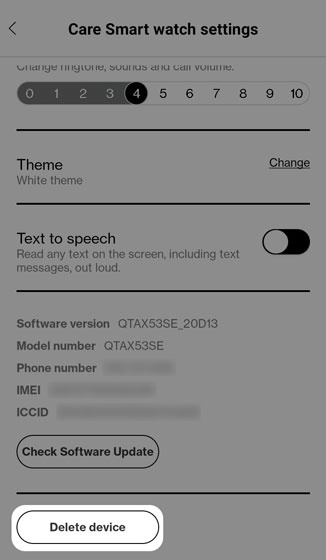
Care Smart app - Remote Factory Data Reset
Here's how to perform a remote factory data reset your Care Smart watch via the Care Smart app.
- This content is only available for the Care Smart watch.
- Ensure the Care Smart app is updated (Google Play™ Store or Apple® App Store®).
- Ensure the Care Smart watch is powered on.
- To reset your device by connecting it to your charger or computer via USB cable, refer to Care Smart watch - Factory Data Reset (Powered On).
- Check out these Care Smart FAQs for more info.
- Open theCare Smart app.If presented with the PIN screen, enter your PIN.
- TapContacts.
- TapManage Devices.
- Tap the desired Care Smart watch.
- TapDelete device(at the bottom; may require scrolling down).Allow several minutes for the factory data reset and reboot processes to complete.To set up the device after the reset has completed, refer to Activate / Set Up Device.