Care Smart app - Add a Trust Circle Contact
Here's how to add a contact (e.g., Trusted contact, Contact, etc.) via the Care Smart app.
- Ensure the Care Smart app is updated (Google Play™ Store or Apple® App Store® ).
- Contacts can only be added via the Care Smart app on the Primary caregiver's smartphone.
- Check out these Care Smart FAQs for more info.
- Open theCare Smart app.If presented with the PIN screen, enter your PIN.
- TapTrust Circle.
- From the 'Trust Circle' section, tap theAdd Contact icon(upper-right).
- Add the following info:
- Tap to Select Contact Photo
- Mobile NumberTap theAddress Book iconto add a contact from your address book.
- Enter contact's first name
- Enter contact's last name
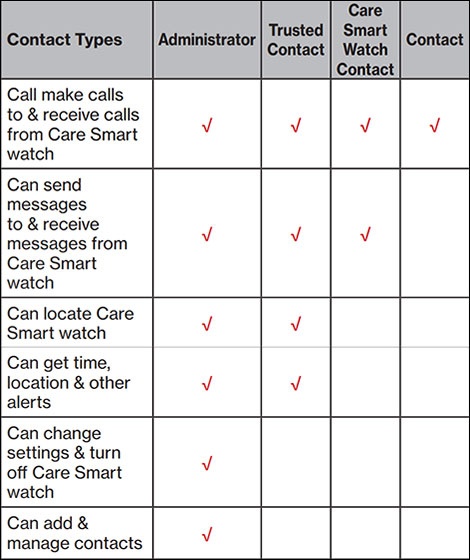
- From the 'Permission level' dropdown, select a permission level then tapSave(upper-right).The available permissions for the Care Smart watch are Primary caregiver, trusted contact and contact.The available permissions for the Apple Watch are Primary caregiver and trusted contact.
- To continue, tapSend invitation.The contact will receive a text message with instructions to install the Care Smart app and accept the invitation.Once the contact has accepted, the watch wearer will receive a notification that their location is being shared.For Apple Watch, the first Trust Circle contact is assigned as the emergency contact. To change it, from the Apple Watch, open the Care Smart app then tap .

Permission Levels