Apple iPhone - Restart Device - Preferred Method
Here's how to restart your iPhone if it crashes and resets, freezes or runs slowly.
- In rare cases, a restart on your Apple® iPhone® could affect data (e.g., backup in progress, cached data, etc.).
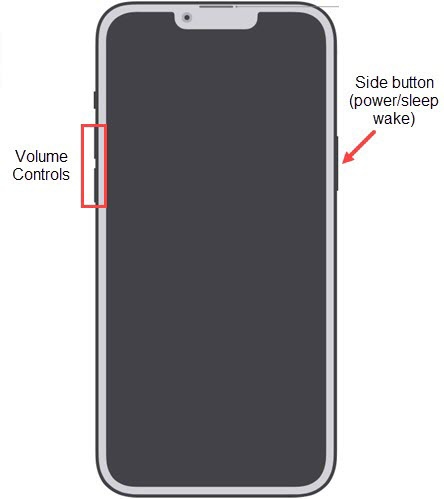
- If you hold the Side button (top right edge) and volume buttons for longer than 5 seconds, your iPhone automatically calls emergency services. Visit the Emergency SOS support page for more info.
iPhone without a Home button
iPhones running iOS 13 or higher, may experience a delay before being able to power cycle the device back on after performing the steps below.
- Press and hold theSide button(top right edge) and eitherVolume Button.
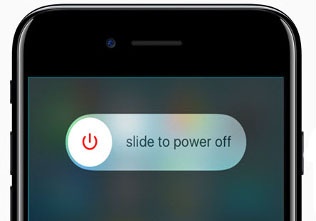
- When "slide to power off" appears, release buttons.
- Slide thePower switchright.Allow several seconds for the device to power off.
- With the device powered off, press and hold theSide button(top right edge) until the Apple logo appears then release.If your device won't power back on, partially charge the device then retry.
Have questions on how to power off other phone models? Check out our power off phone troubleshooting page for more info.
iPhone with a Home button
- Press and hold thePower button(right edge) until 'slide to power off' appears then release.For some iPhone models, power button is located on the top-right edge.If the device is unresponsive, attempt the alternate method.
- Slide thePower switchright.Allow several seconds for the device to power off.
- With the device powered off, press and hold thePower buttonuntil the Apple logo appears then release.If your device won't power back on, partially charge the device then retry.
Have questions on how to power off other phone models? Check out our power off phone troubleshooting page for more info.