5G Home Router - View Technical Router Info
Here's how to view the technical router info (Device ID/ IMEI) on the 5G Home Router.
- This content is for 5G Home Internet. Here's info on Fios Home Internet.
- 5G Home Internet service is currently offered in specific areas. Here's how to check for 5G coverage availability.
You can also view router details from your My Verizon app.
Internal
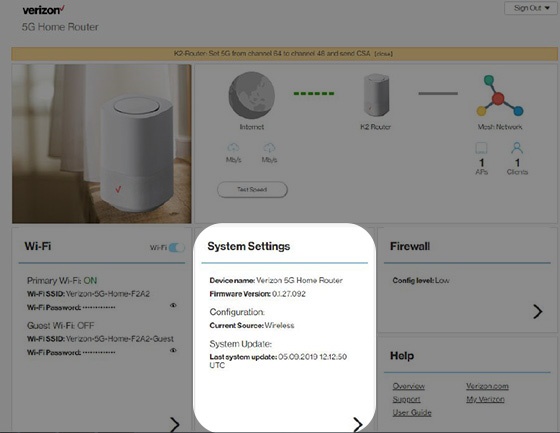
- Sign in to the Admin WebGUI.You must be connected to the 5G Home Internet network to access the admin page.
- From the Router Home screen, clickSystem Settings.
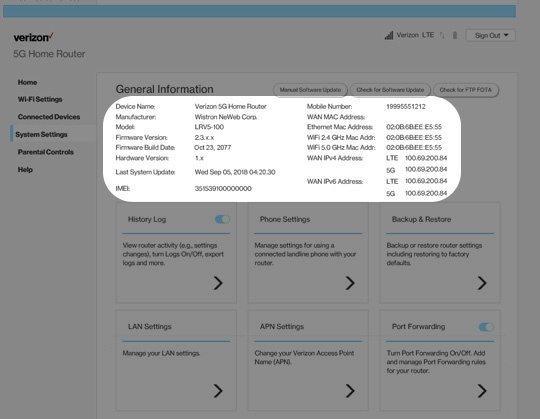
- From the General Information screen, view the following device info:
- IMEI (Device ID)
- Ethernet MAC Address
- WiFi 2.4GHz MAC Address
- WiFi 5.0GHz MAC Address
- WAN IPv4 Address
- WAN IPv6 Address
External
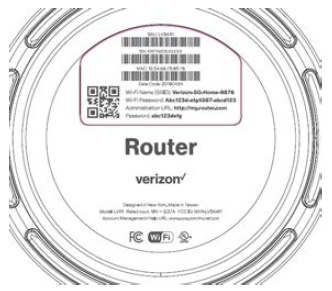
- From the bottom of the Router, view the device info located on the label:
- IMEI (Device ID)
- MAC address