Samsung Galaxy S10 - Factory Data Reset (Powered Off)
Here's how to factory / hard reset your Galaxy S10e / S10 / S10+ if the screen freezes or call, app, audio or sync issues occur and the device won't start up.
- Perform a factory data reset only if necessary as it removes your Google™ account and all data including system data, app data and media.
- For devices with Android™ Device Protection turned on, it's imperative Google sign-in credentials are known prior to completing a factory reset with the device powered off. If credentials are unknown, do one of the following:
- Attempt to sign in with any Google account previously used on the device.
- Reset the password via the https://www.google.com/accounts/recovery website.
- If a pattern, PIN, etc. is or has ever been set up on the device, Google account sign-in is required during initial setup.
- Ensure the device is powered off.If the device is responsive and can be powered on, the preferred reset method should be performed.
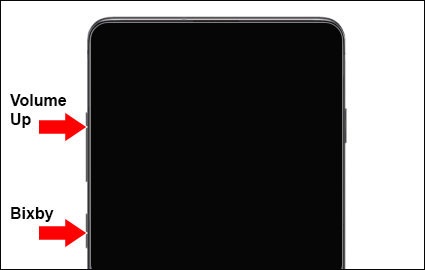
- Simultaneously press and hold theVolume up buttonand theBixby button.
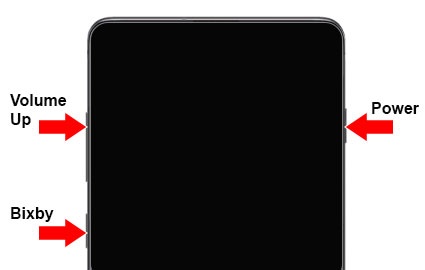
- While continuing to hold Volume up and Bixby, press and hold thePower buttonuntil the device vibrates and the Samsung logo appears then release all buttons.This action boots the device to the Android Recovery screen.Allow up to 15 seconds for the recovery screen to appear.
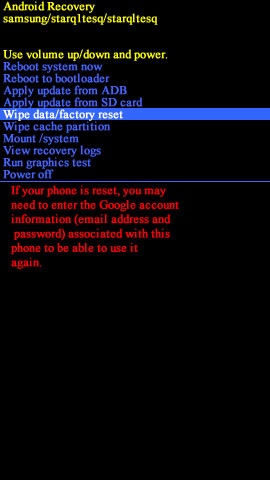
- From the Android Recovery screen, selectWipe data/factory reset.Utilize the Volume buttons to cycle through the available options and the Power button to select.
- SelectYes.Allow several seconds for the factory data reset to complete.
- SelectReboot system now.