Apple iPhone - Dual SIM with an eSIM - View Digital SIM (eSIM) IMEI
Here's how to view the available SIM IMEI for your dual SIM capable iPhone.
- The steps below apply to the Apple® iPhone® SE (3rd Gen), iPhone XS / XS Max, and newer models.
- Ensure the software on your device is updated to iOS 12.1 or higher. If needed, refer to Install Device Software Updates.
- From a Home screen, tapSettings
.
If an app isn't available on your Home screen, swipe left to access the App Library. - Navigate: .
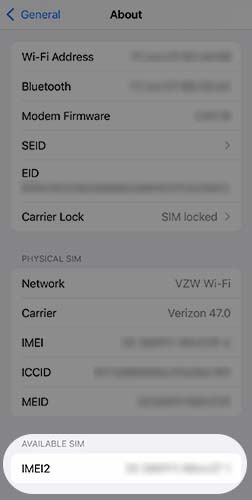
- Scroll down to the 'Available SIM' section and view the IMEI.If Dual SIM is active, 'Available SIM' won't be displayed.
For additional Dual SIM info, check out this Apple article.