Samsung Galaxy Note8 - View / Restrict Data Usage by App
Here's how to view / restrict the amount of data an app on your Galaxy Note8 uses.
Some apps depend on background data (transferring data when not directly in use). Restricting background data may cause those apps to stop functioning unless a Wi-Fi connection is available.
If using Bixby Voice or Simplified view, you must switch to standard view to navigate the steps below. To modify the view, swipe the . 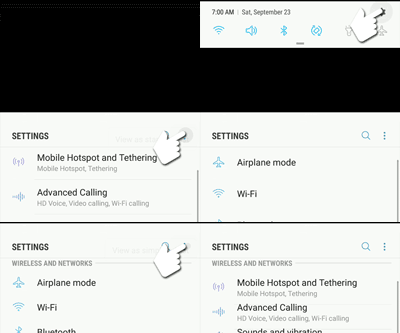
Status bar
down then navigate: Settings icon 
Menu icon 
View as standard list
- From a Home screen, swipe up or down from the center of the display to access the apps screen.These instructions only apply to Standard mode and the default Home screen layout.
- Navigate:.SettingsConnectionsData usage
- From the Mobile section, tapMobile data usage.
- Select an app (below the usage graph) then view the usage.To restrict the app from using data in the background, tap the Allow background data usage switch to turn off
.

Click here for info on setting data limits / warnings and changing the usage cycle on your device.