Apple Watch - Turn Bluetooth On / Off
Here are links on how to disable wireless connections (including Bluetooth) on your Apple Watch.
- The steps below apply to the Apple Watch® Series 3 and newer models.
- Your Apple Watch uses Bluetooth®, Wi-Fi, and cellular to stay in constant contact with your iPhone.
- To disable these wireless connections, turn Airplane mode on.
- For additional help, refer to: Apple Watch Support.
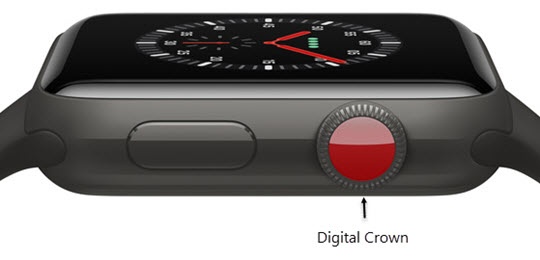
- From the Watch face screen, press theDigital Crownto access the Apps screen.
- Tap theSettings icon.
- TapBluetooth.
- Tap theBluetooth switchto turn on
or off
.
Your Apple Watch automatically searches for nearby Bluetooth accessories when Bluetooth is turned on.