Session status messages
Session Status

Due to inactivity, your session will end in approximately 2 minutes. Extend your session by clicking OK below.

Due to inactivity, your session has expired. Please sign in again to continue.

Activate Visual Voicemail - ASUS

2026-10-22 21:15:46.188

Activate Visual Voicemail - ASUS

Here's how to activate Visual Voicemail on your ASUS device.
Only Basic Voice Mail is available for devices active on prepaid plans.
  1. From a Home screen, tap the
    Apps icon
    Apps icon.
  2. From the Apps tab, navigate:
    Verizon Apps Folder Verizon Apps Folder icon
    Voicemail Visual Voicemail app
    .
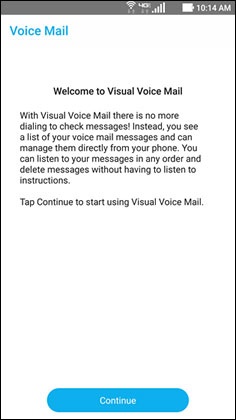
  3. From the 'Welcome' screen, tap
    Continue
    .
    Welcome Screen
  4. To continue, review the Terms and Conditions and then tap
    Accept
    .