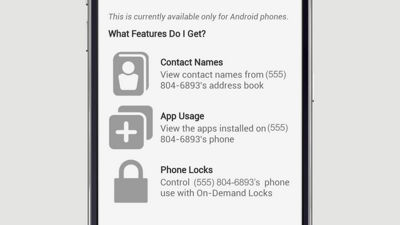
If any of your kids have an Android phone, download the FamilyBase Companion App on to their device so you can get additional features like on-demand lock, viewing their app usage, and viewing the names of their contacts.
| Session Status |
|---|
|
Due to inactivity, your session will end in approximately 2 minutes. Extend your session by clicking OK below. Due to inactivity, your session has expired. Please sign in again to continue. |
How to Lock Your Kid's Phone with Verizon FamilyBase™
(Video Length- 1:18 )
familybase-companion-app-video: Video Transcript
How to Lock Your Kid's Phone with Verizon FamilyBase™ (1:18)
Locking Your Child's Device With the Verizon FamilyBase Companion App
If any of your kids have an Android™ phone, download the FamilyBase Companion App onto their device so you can get additional features like on-demand lock, app usage, and contact names.
Using the FamilyBase mobile app on Your device, from the Activity screen, tap the menu icon in the top left corner, and then select Get More Features. Read about the additional features and then tap Show Me How. Follow the on-screen instructions. We suggest that you have your kid's Android phone with you to receive instructions via text message about downloading the Companion App.
To lock your kid's phone once they have the Companion app, simply open the FamilyBase App on your phone, tap the menu icon in the top left corner and select Phone Lock. You'll see an option to Lock Phone for 30 minutes. To unlock the phone simply select Unlock. Don't worry; your kid can always access 911 in an emergency, even if the phone is locked.
To lock their phone from My Verizon, sign in and select Manage FamilyBase from the My Services menu in the My Verizon navigation. Next, click Controls from the FamilyBase menu, then click Lock Phone for 30 minutes.