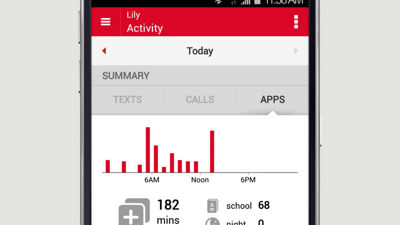
How to See Your Kid's Activity With Verizon FamilyBase
Launch the FamilyBase mobile app on your device and you'll immediately see a summary of who your kid is texting. Tap the Calls and Apps tab to see the details around that usage.
To see activity occurring during school and night hours or change restrictions, tap the icon in the top right of the page. Make your selection and then follow the prompts to save your changes.
To view activity from My Verizon, sign in and select Manage FamilyBase from the My Services menu in the My Verizon navigation. You'll see a summary of the past 7 days, but for more information, click All Activity. Click Contacts to see who your kids are interacting with the most.
To see even more information about your kids activities, like contact names and app usage using Verizon FamilyBase, you need to have the FamilyBase companion App installed on their Android phone.
To see who your kid is interacting with most, tap the menu icon in the top left corner, and then select Contacts, and to see what Apps they are using, select Apps.