Hello, and congratulations on your recent Edge purchase.
Here is some useful information to help you understand the Edge charges on your upcoming bill.
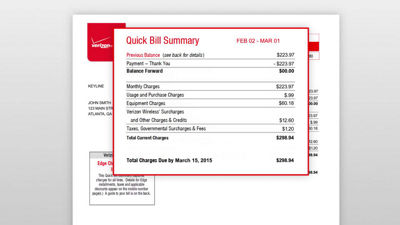
You'll first see a quick bill summary, which captures the charges and payments for all the lines on your account. Your Edge equipment charges and applicable credits, are rolled up into these charges on each row.
To see the itemized details of your Edge charges, you'll need to go to the line level breakdown in your bill. If you’re viewing your bill online, click the "Charges By Line" tab.
Once at line level, you'll see the "Monthly Charges" heading. If you qualify for a MORE Everything credit on your monthly line access, the credit can be found immediately following your access charge. You may also have partial charges if you made a price plan change during your order.
Just below is the equipment charges section, Here, you'll see your monthly installment charge for your Edge device. You'll also see payments made, and remaining balance.
In some states the sales tax for the retail price of your device will be billed to you monthly. You'll find this under the "Usage and Purchases" section, under "Taxes, Governmental surcharges and fees."
If you have additional questions about about the Edge program, please visit our FAQs at verizonwireless.com/edge/faqs.
Congratulations again on your new Verizon Edge purchase.