HD Voice - Place an HD Voice Call
Here's how to place a HD voice call from your smartphone.
HD Voice:
- requires both parties to be in the Verizon 4G LTE coverage area, have HD Voice capable devices and be provisioned for HD Voice service.
- is included in existing voice plans and minutes are billed as regular voice calls. No data charges apply.
- is not recommended if you use a TTY / TDD device.
- From a Home screen, tap the .If unavailable, navigate:.
- From the keypad tab, enter the preferred number then tapSend
(located at the bottom).
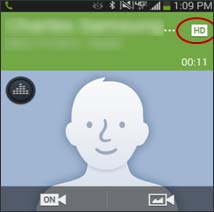
Upon successful connection, an HD indicatorappears.
The image below is for informational purposes only. The actual location of the HD icon may vary.