Verizon Cloud - Website - Add Contacts
Here's how to add contacts via the Verizon Cloud website.
To learn more about Verizon Cloud, check out these Verizon Cloud FAQs.
If you receive a warning message from your browser, refer to these out of date browser FAQs.
Only compatible info is synced to the device.
- From a web browser on a computer, sign in to My Verizon.
- Navigate: .
- From the 'Verizon Cloud' section, clickManage.
- ClickAccess Verizon Cloud.
- From the 'How to access Verizon Cloud' page, click Verizon Cloud web portal (in the 'Access my Cloud' section).
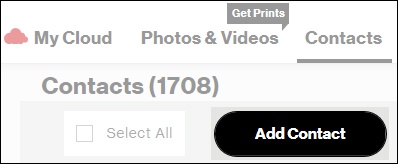
- ClickContacts.
- ClickAdd Contact.
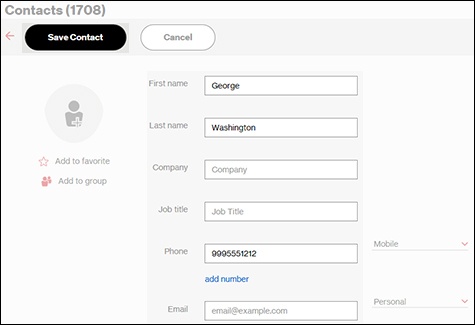
- Enter the info into the applicable fields (e.g., First Name, Last Name, etc.) then clickSave Contact.For instructions on adding a picture, refer to Edit Contacts.Requirements for a contact:
- Phone field can only contain the following characters: 0123456789*#.
- Email field must have an @ and a period in it.