Verizon Jetpack® 4G LTE Mobile Hotspot MiFi® 5510L - Network Mode Settings
View this info on network mode settings if you're having issues with voice / data services on your Mobile Hotspot MiFi 5510L.
Admin Web Interface
- Access the Admin Web Interface.
- From the left menu, clickJetpack Settings.
- From the Advanced tab, clickContinue(located on the right).
- ClickNetworks.
- From the "Preferred network technology" field, click theDropdown menu.
- Click the appropriate setting:
- Automatic (4G LTE, CDMA)
- 4G LTE only
- ClickSave Changes(lower-right).
Home Screen
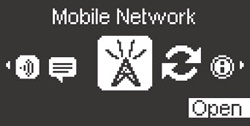
- From the Home screen, selectMenu.Utilize the Scroll buttons to highlight and the Select button to select.
- Highlight Mobile Network then selectOpen.
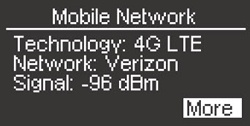
- From Mobile Network, selectMore.
- From Preferred Network, utilize the Scroll buttons to cycle through the available networks then selectSet.
- Automatic (4G LTE, CDMA)
- 4G LTE only
- The device restarts in the selected network mode.