Apple iPad - Upgrade iCloud Storage Space
Here's how to change your iCloud storage plan from your iPad.
- From the Home screen on your Apple® iPad®, tapSettings
.
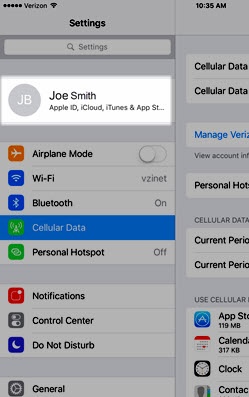
- Tap your Apple profile (at the top).
- TapiCloud.If prompted, enter the Apple ID and password then tapSign In.
- TapChange Storage Plan.If unavailable, tapManage Storage.iCloud® provides 5GB of free storage.
- Select the upgrade option (e.g., 50GB, 200GB, etc.).Selected when a checkmark is present.
- TapUpgrade to Cloud+.If unavailable, tapBuy.
- TapSubscribe.If prompted, enter the Apple ID and password then tapSign In.
- Verify payment info then tapDone(located in the upper-right).
- Some features / services require a Wi-Fi connection, aren't available in all countries and access is limited to 10 devices.
- For additional information, refer to Manage your iCloud storage.